# Having error in restarting space
**URL:**
**Author:**  [@Ayuprime1](/static-proxy?url=https%3A%2F%2Fdiscuss.huggingface.co%2Fu%2FAyuprime1)%5C
**Post date:** [February 17, 2026, 2:12pm UTC](/static-proxy?url=https%3A%2F%2Fdiscuss.huggingface.co%2Ft%2Fhaving-error-in-restarting-space%2F173572%2F1 "2026-02-17T14:12:13Z")
I created a space today created some (docker and main.py etc) added secret and when I click to restart it shows error. This is having from 4 hours. I have deployed same files on vps and it worked so I don’t think that this problem is from my side.
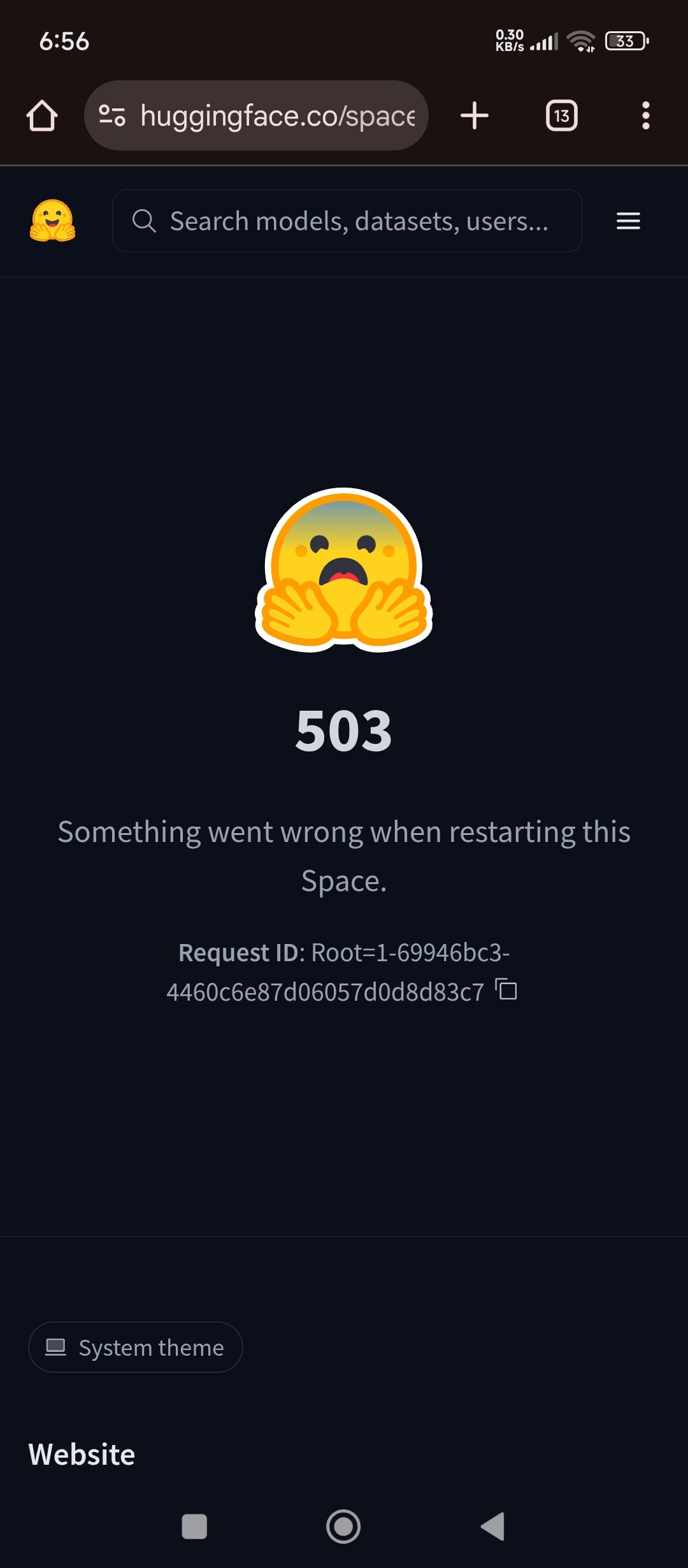
---
**Author:**  [@system](/static-proxy?url=https%3A%2F%2Fdiscuss.huggingface.co%2Fu%2Fsystem)%5C
**Post date:** [February 17, 2026, 2:12pm UTC](/static-proxy?url=https%3A%2F%2Fdiscuss.huggingface.co%2Ft%2Fhaving-error-in-restarting-space%2F173572%2F2 "2026-02-17T14:12:14Z")
Unlisted on February 17, 2026, 2:12pm UTC
---
**Author:**  [@system](/static-proxy?url=https%3A%2F%2Fdiscuss.huggingface.co%2Fu%2Fsystem)%5C
**Post date:** [February 17, 2026, 2:42pm UTC](/static-proxy?url=https%3A%2F%2Fdiscuss.huggingface.co%2Ft%2Fhaving-error-in-restarting-space%2F173572%2F3 "2026-02-17T14:42:27Z")
Listed on February 17, 2026, 2:42pm UTC
---
**Author:**  [@John6666](/static-proxy?url=https%3A%2F%2Fdiscuss.huggingface.co%2Fu%2FJohn6666)%5C
**Post date:** [February 17, 2026, 3:38pm UTC](/static-proxy?url=https%3A%2F%2Fdiscuss.huggingface.co%2Ft%2Fhaving-error-in-restarting-space%2F173572%2F4 "2026-02-17T15:38:58Z")
Without seeing the actual code, it’s hard to say for sure, but it’s quite common for something to work in other environments but not in HF Spaces:
* * *
## What that restart **503** means (background)
In Spaces, **“503 — Something went wrong when restarting this Space”** is a _generic_ UI error. It usually means Hugging Face could not complete one of these phases:
1. **Build failed** (dependency install / Docker build / image pull)
2. **Container/app started then crashed** (exception, missing env var/secret, import error)
3. **Container/app stayed up but never became “healthy”** (very common with Docker when port/host is wrong or the web server never starts listening) ([Hugging Face Forums](/static-proxy?url=https%3A%2F%2Fdiscuss.huggingface.co%2Ft%2Fmy-space-was-paused-and-503-when-restart%2F171474 "My space was paused and 503 when restart - Beginners"))
The on-screen **`Request ID: Root=...`** is an internal correlation ID that HF staff can use to trace the failure; it usually won’t tell you the cause by itself. ([Hugging Face Forums](/static-proxy?url=https%3A%2F%2Fdiscuss.huggingface.co%2Ft%2Frestart-fail-error-503%2F173425 "Restart Fail error (503) - Spaces"))
Pinpointing the cause is about identifying **which phase** you’re in.
* * *
## Step 1 — Rule out “it’s not you” in 30 seconds
If this started happening suddenly and persists for hours, check the Hugging Face status page for **Spaces** issues (proxy/build/scheduler incidents can surface as 5xx). If there’s an incident, your code may be fine.
* * *
## Step 2 — Use logs to classify the failure (this is the key)
Open the Space page → **Logs** and check both:
- **Build logs** → failures during image build/install
- **Runtime/Container logs** → failures after the container starts
Then branch:
### A) Build logs show an error → build-time issue
Common signatures:
- `pip` dependency conflicts (“ResolutionImpossible”, “No matching distribution found”)
- Dockerfile syntax issues (bad JSON array for `CMD`, typos)
- Missing files / wrong casing (Linux builders are case-sensitive)
### B) Build succeeds but runtime shows a crash loop → runtime issue
Common signatures:
- Python traceback at import/startup
- missing secret/env var
- wrong entrypoint command
### C) Build succeeds and runtime doesn’t crash, but Space never becomes reachable → “not healthy”
This is the most common “works on VPS, fails on Spaces” pattern, especially with Docker. ([Hugging Face Forums](/static-proxy?url=https%3A%2F%2Fdiscuss.huggingface.co%2Ft%2Fhf-space-stuck-at-starting%2F170911 "HF Space stuck at Starting"))
* * *
## Step 3 — If you’re using **Docker** , check the 3-way port alignment (most common root cause)
On a VPS, a reverse proxy (nginx/traefik) or different port mapping often masks mistakes. In Docker Spaces, HF’s proxy expects your app to be reachable **inside the container** on the configured port (commonly **7860** ) and bound to **0.0.0.0**. ([Hugging Face Forums](/static-proxy?url=https%3A%2F%2Fdiscuss.huggingface.co%2Ft%2Fhf-space-stuck-at-starting%2F170911 "HF Space stuck at Starting"))
### The “must match” triangle
#### 1) `README.md` YAML
```yaml
---
sdk: docker
app_port: 7860
---
```
HF docs and community triage repeatedly point to `app_port` mismatch as a reason a Space stays unhealthy. ([Hugging Face Forums](/static-proxy?url=https%3A%2F%2Fdiscuss.huggingface.co%2Ft%2Fhf-space-stuck-at-starting%2F170911 "HF Space stuck at Starting"))
#### 2) Dockerfile
```dockerfile
EXPOSE 7860
CMD ["python", "-u", "main.py"]
```
#### 3) Your server actually listens on `0.0.0.0:7860`
Examples:
**Uvicorn/FastAPI**
```bash
uvicorn main:app --host 0.0.0.0 --port 7860
```
**Gradio**
```python
demo.launch(server_name="0.0.0.0", server_port=7860)
```
This exact host/port fix is the standard resolution for “Starting/Restart 503” when everything else looks fine. ([Hugging Face Forums](/static-proxy?url=https%3A%2F%2Fdiscuss.huggingface.co%2Ft%2Fhf-space-stuck-at-starting%2F170911 "HF Space stuck at Starting"))
### Prefer using the `PORT` env var (safe pattern)
Many Spaces examples use:
- `--port ${PORT:-7860}` (shell)
- `os.environ.get("PORT", 7860)` (Python)
because the platform may provide `PORT`, while still defaulting cleanly to 7860. ([Hugging Face Forums](/static-proxy?url=https%3A%2F%2Fdiscuss.huggingface.co%2Ft%2Fmy-space-was-paused-and-503-when-i-restart%2F171477 "My space was paused and 503 when I restart - Beginners"))
* * *
## Step 4 — Health/timeout problems: “it starts too slowly”
HF infra expects the service to **bind to the exposed port within the startup timeout** (default commonly referenced as **30 minutes** ). ([Hugging Face Forums](/static-proxy?url=https%3A%2F%2Fdiscuss.huggingface.co%2Ft%2Flaunch-timed-out-space-was-not-healthy-after-30-min-space-keeps-on-building%2F63685 "Launch timed out, space was not healthy after 30 min ..."))
If your app does big downloads/model loads before starting the web server:
### How to pinpoint
- Runtime logs show long work (downloads, loading model weights) but **no “server listening on …”**
- Or the Space flips unhealthy after waiting
### Fix options
1. Start the server quickly; lazy-load models on first request.
2. If you truly need more time, set:
```yaml
startup_duration_timeout: 1h
```
in `README.md` YAML. ([Hugging Face](https://huggingface.co/docs/hub/en/spaces-config-reference "Spaces Configuration Reference"))
* * *
## Step 5 — Secrets/env vars: common “works locally, fails on Spaces” trap
### Runtime secrets
For Docker Spaces, secrets/variables are managed in Space settings and are exposed to the app as environment variables. ([Hugging Face](https://huggingface.co/docs/hub/en/spaces-sdks-docker "Docker Spaces"))
**Pinpointing tip**
- If runtime logs show `KeyError: ...` or auth failures right at startup, it’s often a missing/misspelled secret.
**Make the error obvious**
Instead of crashing deep later, validate early and log a clear message (e.g., “Missing API\_KEY”).
### Build-time variables (important nuance)
If your Dockerfile expects secrets during `RUN ...` steps, that can fail because build-time values are handled differently. Community guidance for Docker Spaces is to pass needed values as **build args** (`ARG`) when building. ([Hugging Face Forums](/static-proxy?url=https%3A%2F%2Fdiscuss.huggingface.co%2Ft%2Fenvironment-variable-in-build-time%2F104436 "Environment Variable in build time - Spaces"))
* * *
## Step 6 — Add a simple health check (optional, but helps pinpoint)
A Docker `HEALTHCHECK` can make “it’s running but not serving” obvious. A common pattern is curling the local port and failing if it doesn’t respond. ([Hugging Face](https://huggingface.co/spaces/ClemSummer/ai-lab/commit/54c9e50cc9e513b47e2f37606909293a323d18f2 "fix: set app\_port to 7860 to match Docker CMD"))
Example:
```dockerfile
RUN apt-get update && apt-get install -y curl
HEALTHCHECK CMD curl --fail http://localhost:7860/ || exit 1
```
* * *
## Step 7 — If logs are empty or the Space UI is “stuck”
If you see symptoms like:
- restart always 503,
- build never produces real logs,
- hardware/settings UI spins or rebuilds don’t trigger,
then it may be a backend/scheduler state rather than your code. One practical way to pinpoint is:
1. **Duplicate the Space** with the same repo/commit.
2. **Factory rebuild / factory reboot** (forces a clean rebuild).
This pattern appears in multiple community reports. ([Hugging Face Forums](/static-proxy?url=https%3A%2F%2Fdiscuss.huggingface.co%2Ft%2Fcant-restart-or-rebuild-the-space%2F169109 "Can't restart or rebuild the space"))
* * *
## Minimal “pinpoint checklist” you can follow in order
1. **Logs → Build**
2. **Logs → Runtime**
3. **If Docker: confirm**
4. **If slow startup**
5. **If secrets involved**
6. **If still opaque**
---
**Author:**  [@Ayuprime1](/static-proxy?url=https%3A%2F%2Fdiscuss.huggingface.co%2Fu%2FAyuprime1)%5C
**Post date:** [February 18, 2026, 7:16am UTC](/static-proxy?url=https%3A%2F%2Fdiscuss.huggingface.co%2Ft%2Fhaving-error-in-restarting-space%2F173572%2F5 "2026-02-18T07:16:43Z")
My code doesn’t have any error. I have deployed it on my computer and checked it and I have changed the port from 8000 to 7860 while uploading my files to hugging face. Here’s logs ==== Build Queued at 2026-02-17 13:43:05 / Commit SHA: 169fe40 =====
- → FROM [Docker Hub Container Image Library | App Containerization](http://docker.io/library/python:3.10-slim@sha256:e508a34e5491225a76fbb9e0f43ebde1f691c6a689d096d7510cf7fb17d4ba6f)
Just these.