Instructions to use prithivMLmods/QwQ-LCoT-3B-Instruct with libraries, inference providers, notebooks, and local apps. Follow these links to get started.
- Libraries
- Transformers
How to use prithivMLmods/QwQ-LCoT-3B-Instruct with Transformers:
# Use a pipeline as a high-level helper from transformers import pipeline pipe = pipeline("text-generation", model="prithivMLmods/QwQ-LCoT-3B-Instruct") messages = [ {"role": "user", "content": "Who are you?"}, ] pipe(messages)# Load model directly from transformers import AutoTokenizer, AutoModelForCausalLM tokenizer = AutoTokenizer.from_pretrained("prithivMLmods/QwQ-LCoT-3B-Instruct") model = AutoModelForCausalLM.from_pretrained("prithivMLmods/QwQ-LCoT-3B-Instruct") messages = [ {"role": "user", "content": "Who are you?"}, ] inputs = tokenizer.apply_chat_template( messages, add_generation_prompt=True, tokenize=True, return_dict=True, return_tensors="pt", ).to(model.device) outputs = model.generate(**inputs, max_new_tokens=40) print(tokenizer.decode(outputs[0][inputs["input_ids"].shape[-1]:])) - Inference
- Notebooks
- Google Colab
- Kaggle
- Local Apps
- vLLM
How to use prithivMLmods/QwQ-LCoT-3B-Instruct with vLLM:
Install from pip and serve model
# Install vLLM from pip: pip install vllm # Start the vLLM server: vllm serve "prithivMLmods/QwQ-LCoT-3B-Instruct" # Call the server using curl (OpenAI-compatible API): curl -X POST "http://localhost:8000/v1/chat/completions" \ -H "Content-Type: application/json" \ --data '{ "model": "prithivMLmods/QwQ-LCoT-3B-Instruct", "messages": [ { "role": "user", "content": "What is the capital of France?" } ] }'Use Docker
docker model run hf.co/prithivMLmods/QwQ-LCoT-3B-Instruct
- SGLang
How to use prithivMLmods/QwQ-LCoT-3B-Instruct with SGLang:
Install from pip and serve model
# Install SGLang from pip: pip install sglang # Start the SGLang server: python3 -m sglang.launch_server \ --model-path "prithivMLmods/QwQ-LCoT-3B-Instruct" \ --host 0.0.0.0 \ --port 30000 # Call the server using curl (OpenAI-compatible API): curl -X POST "http://localhost:30000/v1/chat/completions" \ -H "Content-Type: application/json" \ --data '{ "model": "prithivMLmods/QwQ-LCoT-3B-Instruct", "messages": [ { "role": "user", "content": "What is the capital of France?" } ] }'Use Docker images
docker run --gpus all \ --shm-size 32g \ -p 30000:30000 \ -v ~/.cache/huggingface:/root/.cache/huggingface \ --env "HF_TOKEN=<secret>" \ --ipc=host \ lmsysorg/sglang:latest \ python3 -m sglang.launch_server \ --model-path "prithivMLmods/QwQ-LCoT-3B-Instruct" \ --host 0.0.0.0 \ --port 30000 # Call the server using curl (OpenAI-compatible API): curl -X POST "http://localhost:30000/v1/chat/completions" \ -H "Content-Type: application/json" \ --data '{ "model": "prithivMLmods/QwQ-LCoT-3B-Instruct", "messages": [ { "role": "user", "content": "What is the capital of France?" } ] }' - Docker Model Runner
How to use prithivMLmods/QwQ-LCoT-3B-Instruct with Docker Model Runner:
docker model run hf.co/prithivMLmods/QwQ-LCoT-3B-Instruct
QwQ-LCoT-3B-Instruct Model Card
The QwQ-LCoT-3B-Instruct model is a lightweight, instruction-tuned language model designed for complex reasoning and explanation tasks. It is fine-tuned on the Qwen2.5-3B-Instruct base model using the QwQ-LongCoT-130K dataset, focusing on long-chain-of-thought (LCoT) reasoning for enhanced logical comprehension and detailed output generation.
| File Name | Size | Description | Upload Status |
|---|---|---|---|
.gitattributes |
1.57 kB | Specifies LFS tracking for large files. | Uploaded |
README.md |
267 Bytes | Basic project information file. | Updated |
added_tokens.json |
657 Bytes | Custom tokens added to the tokenizer. | Uploaded |
config.json |
859 Bytes | Configuration file for the model. | Uploaded |
generation_config.json |
281 Bytes | Configuration file for text generation settings. | Uploaded |
merges.txt |
1.82 MB | Contains the byte-pair encoding (BPE) merges. | Uploaded |
pytorch_model-00001-of-00002.bin |
4.96 GB | First shard of the model weights in PyTorch format. | Uploaded (LFS) |
pytorch_model-00002-of-00002.bin |
1.21 GB | Second shard of the model weights in PyTorch format. | Uploaded (LFS) |
pytorch_model.bin.index.json |
36 kB | Index mapping for sharded model weights. | Uploaded |
special_tokens_map.json |
644 Bytes | Maps special tokens to their roles. | Uploaded |
tokenizer.json |
11.4 MB | Serialized tokenizer data. | Uploaded (LFS) |
tokenizer_config.json |
7.73 kB | Tokenizer configuration settings. | Uploaded |
vocab.json |
2.78 MB | Vocabulary file for the tokenizer. | Uploaded |
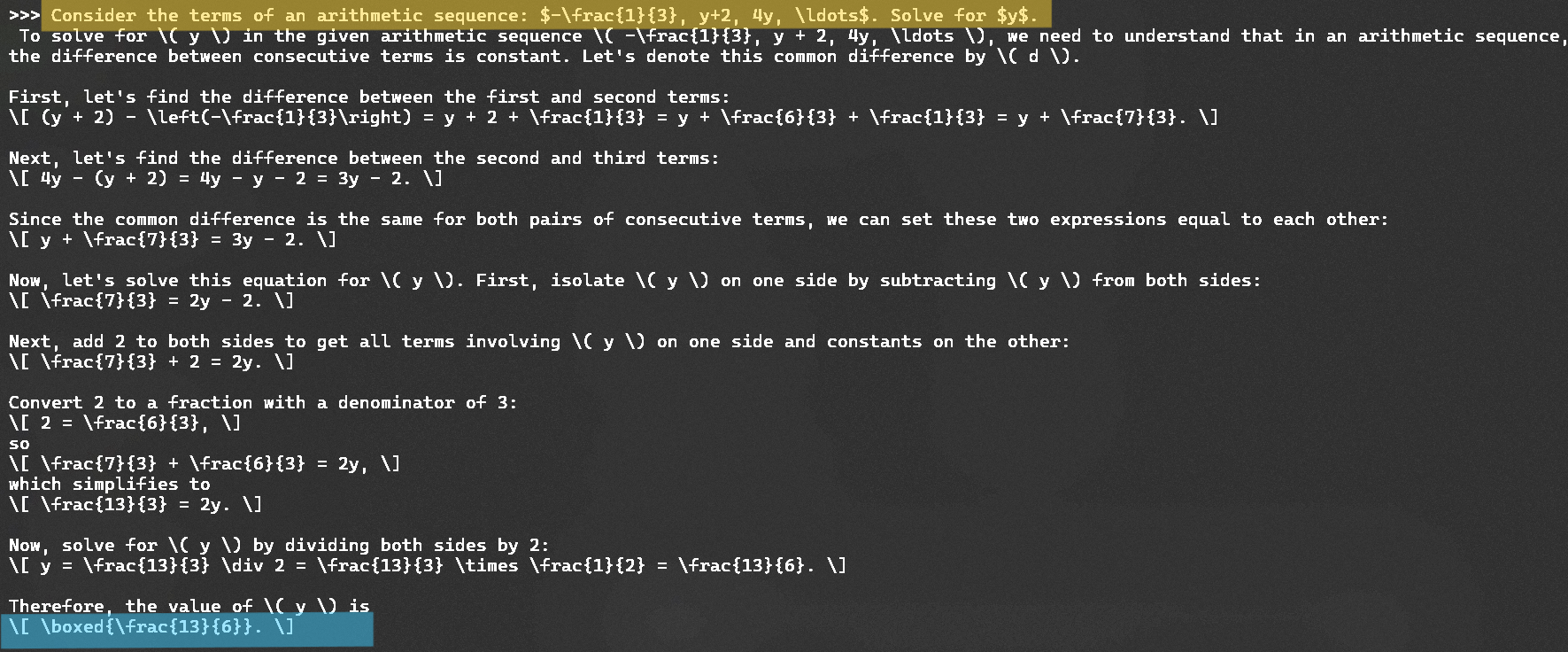
Sample Long CoT:
Key Features:
Long Chain-of-Thought Reasoning:
- Specifically designed to generate comprehensive, step-by-step explanations for complex queries.
Lightweight and Efficient:
- With only 3 billion parameters, it is optimized for systems with limited computational resources without compromising reasoning capabilities.
Instruction Optimization:
- Fine-tuned to follow prompts and provide concise, actionable, and structured responses.
Training Details:
- Base Model: Qwen2.5-3B-Instruct
- Dataset: amphora/QwQ-LongCoT-130K
- Comprising 133,000 annotated samples focusing on logical tasks and structured thinking.
Capabilities:
Text Generation:
- Provides detailed, structured, and logical text outputs tailored to user prompts.
Reasoning Tasks:
- Solves step-by-step problems in math, logic, and science.
Educational Assistance:
- Generates coherent explanations for academic and research purposes.
Dialogue and Summarization:
- Handles conversational queries and summarizes long documents effectively.
Usage Instructions:
Setup: Download all model files and ensure compatibility with the Hugging Face Transformers library.
Loading the Model:
from transformers import AutoModelForCausalLM, AutoTokenizer model_name = "prithivMLmods/QwQ-LCoT-3B-Instruct" tokenizer = AutoTokenizer.from_pretrained(model_name) model = AutoModelForCausalLM.from_pretrained(model_name)Generate Long-Chain Reasoning Outputs:
input_text = "Explain the process of photosynthesis step-by-step." inputs = tokenizer(input_text, return_tensors="pt") outputs = model.generate(**inputs, max_length=300, temperature=0.5) print(tokenizer.decode(outputs[0], skip_special_tokens=True))Customize Output Generation:
Modify thegeneration_config.jsonfile for different scenarios:temperature: Controls randomness (lower = deterministic, higher = creative).max_length: Sets response length.top_p: Adjusts sampling for diversity in outputs.
- Downloads last month
- 26
Model tree for prithivMLmods/QwQ-LCoT-3B-Instruct
Base model
Qwen/Qwen2.5-3B